Guides / Account, billing, and compliance
How to delete your Onyx Phone account or your login
If you're done with Onyx Phone, an account admin can delete the whole account, with its numbers, calls, and texts, from the website. There's a window to change your mind and restore it. This guide shows how to delete the account, what to do instead if you only want to stop paying, and how a teammate can have their own login deleted from the phone app.
Before you start
- To delete the account, you need to be an account admin.
Step 1. Delete the account
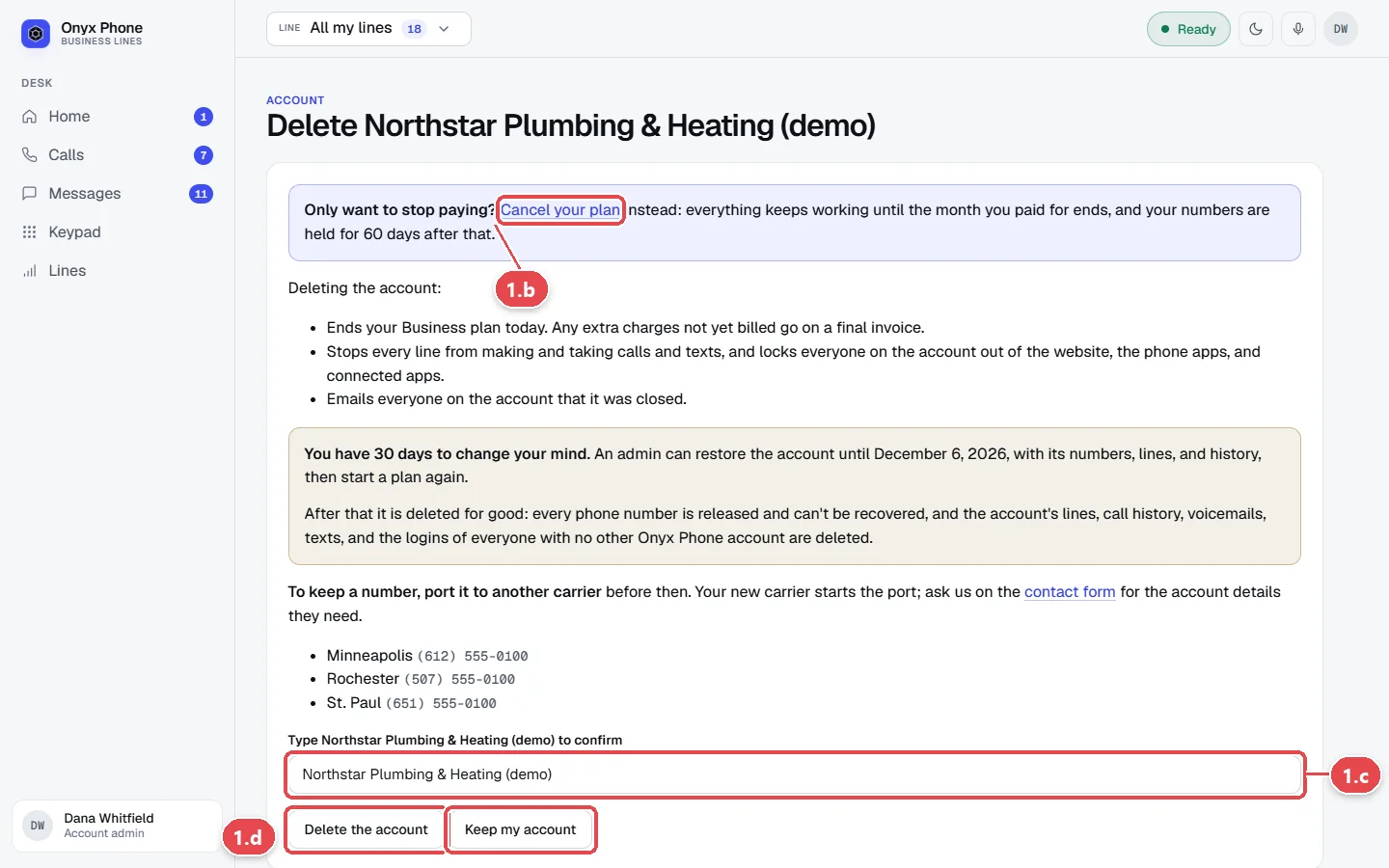
- Step 1.a Go to onyxphone.io/account/close while signed in. You can also get there from Billing after canceling, with Delete the account.
- Step 1.b Read what's deleted. To stop paying but keep your numbers and history, click Cancel your plan instead.
- Step 1.c In the box, type your account's name exactly as shown.
- Step 1.d Click Delete the account. Or click Keep my account to leave without deleting anything.
Step 2. Delete your own login from the phone app iPhone and Android
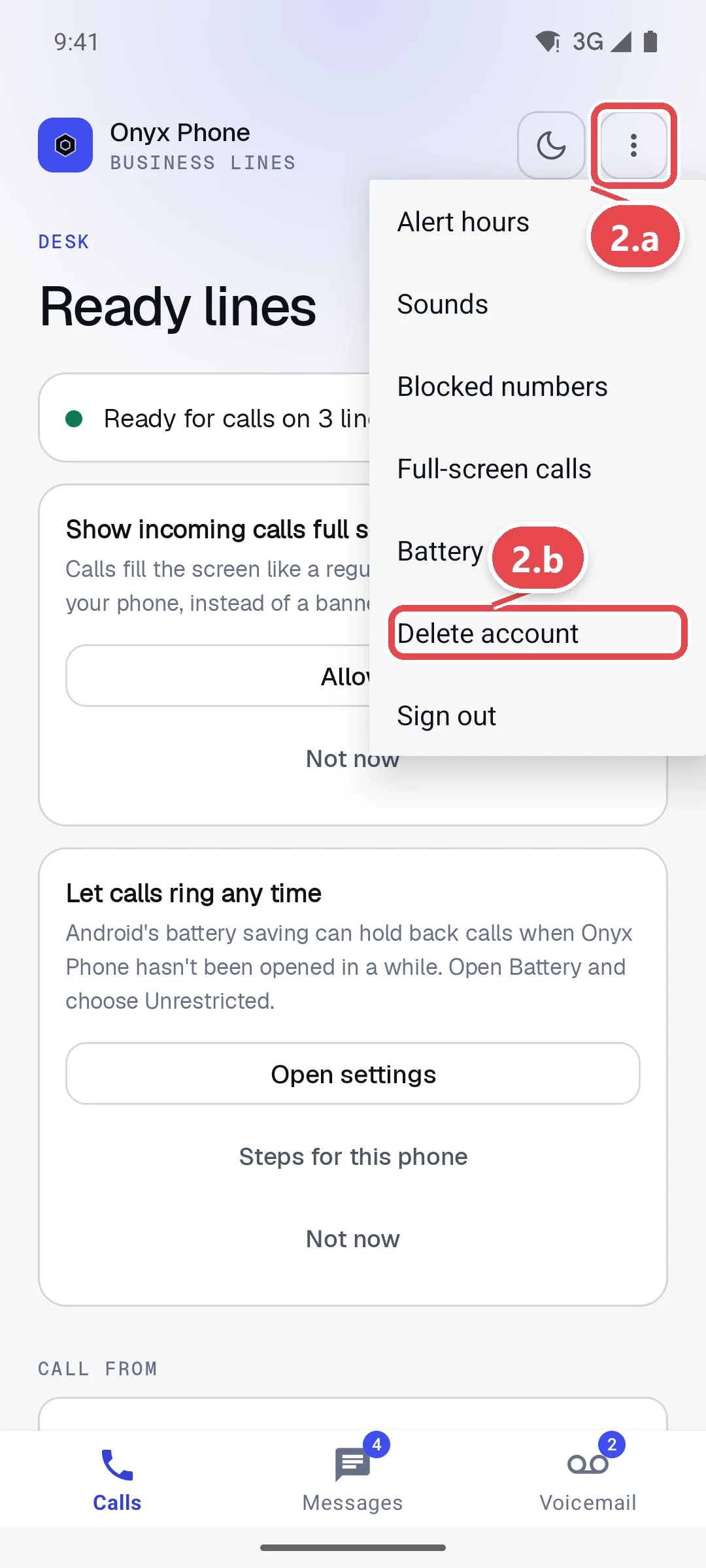
- Step 2.a In the app, tap the ⋮ Settings button at the top right.
- Step 2.b Tap Delete account. Your browser opens our page explaining how to delete your login, for admins and for teammates.
Questions and answers
Can I restore a deleted account?
Yes, for 30 days. An admin can sign in and restore the account with its numbers, lines, and history, then start a plan again. After 30 days it's deleted for good and the numbers are released.
Should I cancel or delete?
Cancel if you might come back. Everything keeps working until the period you paid for ends, and your numbers are held for 60 days after that. Delete if you want everything removed. See Billing.
I'm a teammate. How do I delete my login?
Ask an admin to remove you on Team, or follow the steps on our delete account page.
What happens to our phone numbers?
They're released 30 days after the account is deleted. To keep a number, port it to another carrier before then; ask us on the contact page for the account details your new carrier needs.
Related guides
- How to change your plan, update your card, download invoices, or cancelManage Onyx Phone billing: switch plans or to yearly, update the card on file, download invoice PDFs, see your renewal date, and cancel or keep your plan.
- How to invite teammates and choose which lines they answerInvite teammates to Onyx Phone by email or in bulk, choose the lines each person answers, give extensions, let them call each other, or remove someone.
- How to use My account to manage your profile, billing, and complianceMy account puts your Onyx Phone profile, devices, billing, usage, and business setup (verification, texting, 911) on one page, with the next step for each.
- How to move your existing business number to Onyx PhoneMove your business number to Onyx Phone from AT&T, Verizon, Comcast, or any carrier: fill in the port request, upload a bill, sign, and track it.
Getting started
- Create a login and pick a plan. Checkout saves a card for the 7-day free trial, and nothing is charged until it ends.
- Confirm your business and its 911 address, and get a local number on the spot. Bringing your own number? You answer on a temporary one while it moves over, for free.
- Choose where calls ring, write what callers hear, invite your team, and register for texting. Then answer in the browser, the iPhone and Android apps, or a desk phone. How it works has the details.
Screens change as we improve Onyx Phone; we last checked this guide on November 6, 2026. The screenshots show a made-up business. Markdown version · All guides · Contact us